The XLOOKUP function
The XLOOKUP function is a newer lookup and reference function which is considered to be an upgraded version of the VLOOKUP or HLOOKUP functions, as it more clearly indicates what ranges you are searching and returning from, and includes a built-in error handling arguement.
This is the format of the XLOOKUP function:
=XLOOKUP(LOOKUP VALUE, LOOKUP ARRAY, RETURN ARRAY, IF NOT FOUND, MATCH MODE, SEARCH MODE)Here is an example of the XLOOKUP function:
=XLOOKUP(39.99, C1:C11, B1:B11, "No Course Found", 0)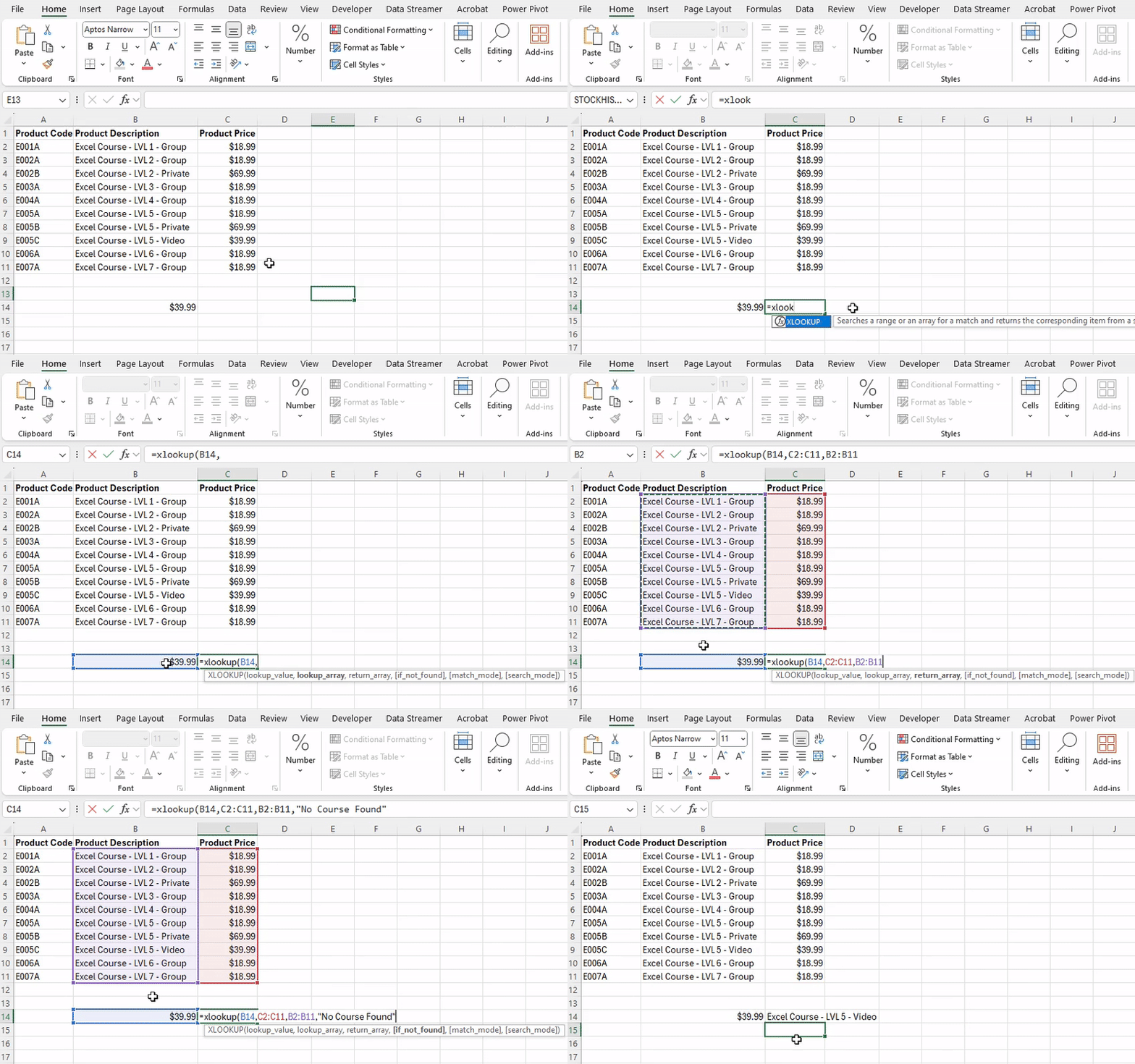
XLOOKUP function returning the value from column B, for the row whose price matches ‘$39.99’
This function is valuable when there are unique or key variables in table that you would like to search, where you may not have the column you want to search being on the far left as would be necessary to use a VLOOKUP.
An example of a functional implementation of this would be creating an invoicing template where you want to use the product description to bring in information such as the product code or price instead of being forced to memorize what all the product codes represent.
ex: Product codes are in column A, the product description is in columns B
=XLOOKUP(PRODUCT CODE, $B:$B, $A:$A, "N/A",0)One additional benefit to XLOOKUP is the ability to choose what type of partial matching you want to use. This is a more advanced feature for specific use cases where you are looking up a numeric value that may not exist in the source table.
An example of this would be if you work with clients on sourcing equipment or services from third parties, and have to stick to a budget. You can choose to alter the MATCH MODE parameter to ‘-1’ which will round down to the nearest number in the file. By doing this, you can input a clients budget for a particular service, and the XLOOKUP will return the service provider that has the price nearest to the budget without going over.